> ## Documentation Index
> Fetch the complete documentation index at: https://docs.payvessel.com/llms.txt
> Use this file to discover all available pages before exploring further.
# Virtual Card API
> PayVessel virtual card API to issue USD Visa and Mastercard cards, fund from your wallet, withdraw, freeze, and receive webhooks for card transactions.
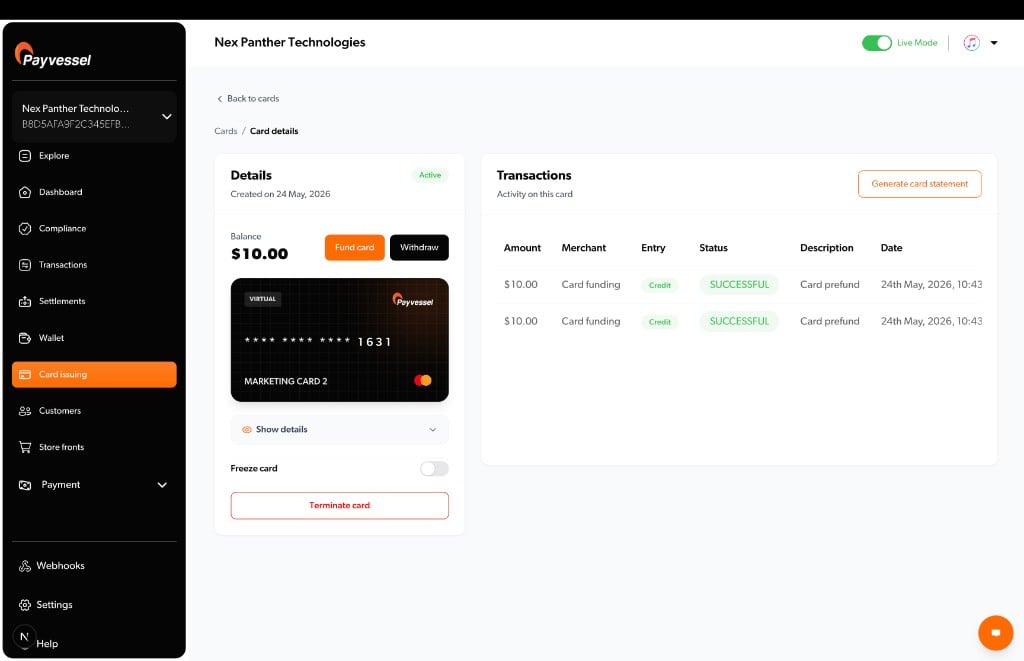
PayVessel **virtual card API** lets you issue **USD virtual cards** (Visa and Mastercard) so your customers can pay online at international merchants. You integrate through the **PayVessel API** using your business **API key** and **secret**; PayVessel handles card enrollment, card lifecycle, and wallet debits for funding.
## Virtual cards
PayVessel issues virtual **Mastercard** and **Visa** cards in **USD** that work on all platforms.
| | |
| ------------------------- | --------------------------------------------------------------- |
| **Validity** | 3 years |
| **Limit per transaction** | \$10,000 |
| **Card balance limit** | \$100,000 |
| **Successive declines** | Card is terminated after **3** consecutive declines |
| **Unfunded cards** | Card is terminated if not funded within **3 weeks** of creation |
## Where can cards be used?
PayVessel virtual **USD** cards are accepted at merchant sites that accept USD cards: commonly US merchants such as Meta (Facebook), PayPal, Google, Snap Inc., Canva, and many more.
Some merchants may decline the card. Restrictions are identified by **MCC** (Merchant Category Code). The following MCCs are **not supported**:
| MCC | Description |
| ---- | ---------------------------------------------------- |
| 4829 | Money Transfers |
| 5962 | Travel Related Arrangement Services |
| 5966 | Outbound Telemarketing Merchants |
| 6051 | Non-Financial Institutions / Cryptocurrency |
| 6211 | Security Brokers / Dealers |
| 7273 | Dating and Escort Services |
| 7297 | Massage Parlors |
| 7800 | Government-owned Lotteries |
| 7801 | Government-licensed Online Casinos (Online Gambling) |
| 7802 | Government-licensed Horse/Dog Racing |
| 7995 | Betting and Online Gambling |
### Restricted countries
Cards cannot be used in countries subject to geographic sanctions, including:
Algeria, Afghanistan, Belarus, Burundi, Central African Republic, Comoros, Congo (Democratic Republic of the), Congo (Republic of the), Cuba, Gambia, Iran, Iraq, Korea (North), Kyrgyzstan, Lebanon, Liberia, Libya, Maldives, Myanmar, Nicaragua, Palestine, Russian Federation, Serbia, Somalia, South Sudan, Sudan, Suriname, Svalbard and Jan Mayen, Syrian Arab Republic, Tajikistan, Togo, Tokelau, Turkmenistan, Ukraine, Uzbekistan, Venezuela, Wallis and Futuna, Yemen, and Zimbabwe.
If you encounter acceptance issues, contact [support@payvessel.com](mailto:support@payvessel.com).
 Issue with KYC and prefund
List cards and status
Load USD from business wallet
Calculate fees before create or fund
***
## What you can do
| Capability | Description |
| ------------------------ | ----------------------------------------------------------------------------------------------- |
| **Create customer card** | Enroll or upgrade customer KYC, issue a USD virtual card, prefund from your business USD wallet |
| **List / get card** | Track `PENDING` → `ACTIVE`, masked PAN, card balance |
| **Fund card** | Debit business USD wallet; credit the card balance |
| **Withdraw** | Move USD from card back to business wallet (minimum \$3) |
| **Freeze / unfreeze** | Temporarily block or restore card spend |
| **Terminate** | Close card; remaining balance returns to business wallet (minus fees) |
| **Transactions** | Card spend, funding, and withdrawal history |
| **Simulate transaction** | Sandbox-only test spend/credit simulation |
| **Fee quotes** | Calculate charges before create, fund, or withdraw |
***
## Customer KYC
The PayVessel API requires **full Nigerian KYC on every create request**.
| Field | Required | Notes |
| --------------------------------------- | -------- | ------------------------------------------- |
| `first_name`, `last_name` | Yes | Customer legal name |
| `email`, `phone` | Yes | Nigerian phone format |
| `bvn`, `nin` | Yes | 11 digits |
| `dob` | Yes | `YYYY-MM-DD` |
| `image` | Yes | Base64 identity image |
| `state`, `lga`, `street`, `postal_code` | Yes | Address |
| `brand`, `currency` | Yes | USD only |
| `prefund_amount` | No | Optional; minimum **\$3 USD** when provided |
***
## Money movement
**Fund** and **create-time prefund** debit your PayVessel **business USD wallet** (managed wallet). **Withdraw** and **terminate** credit it back (withdrawal fee may apply).
PayVessel holds and syncs the spendable `balance` on the card object after fund, withdraw, and card activity. Do not assume your local ledger matches the API balance without calling **Get card**.
Merchant charges (AUTHORIZATION, SETTLEMENT, etc.) reduce **card balance**. PayVessel will charge applicable fees to your business USD wallet.
***
## Card statuses
| Status | Meaning |
| ------------ | ---------------------------------------------------- |
| `PENDING` | PayVessel is provisioning the card; no PAN yet |
| `ACTIVE` | Card can be funded and used |
| `FROZEN` | Spend blocked; fund/withdraw may still be restricted |
| `TERMINATED` | Closed; balance settled to wallet |
| `FAILED` | Card creation failed |
***
## Fees
Use [Card Fee Quote](/virtual-cards/fee-quote) to calculate fees for a given operation (`issuance`, `funding`, `withdrawal`, `spend`, etc.) before debiting your wallet.
Funding fee tiers:
* Below tier threshold: flat fee in USD
* At or above tier: percentage of fund amount
***
## Error handling
| HTTP | Typical cause |
| ----- | -------------------------------------------------------------- |
| `401` | Missing or invalid `api-key` / `api-secret` |
| `400` | Validation (KYC, minimum amounts, insufficient wallet balance) |
| `404` | Unknown `card_id` for your business |
| `429` | API rate limit |
Responses use `{ "status": true|false, "message": "...", "data": ... }`. Validation errors may include a `errors` object.
***
## Security best practices
Never persist `card_number`, `cvv`, or `expiry` in your database, cache, session storage, or mobile secure storage. Store only the PayVessel `card_id` and non-sensitive metadata (status, `masked_pan` from list).
When your customer must view or use the card, call [Get a Card](/virtual-cards/get-card) from your **backend** at that moment. Return credentials to your client over HTTPS only for the active session: do not keep them after the user leaves the screen.
Never call the PayVessel API from a mobile app or browser with `api-key` / `api-secret`. All create, fund, and credential retrieval flows must run on your server.
Do not write PAN, CVV, or expiry to application logs, crash reports, analytics, webhooks you forward, or support tickets. Redact these fields in any debug output.
***
## Guides and API reference
Conceptual guides (how it works, use cases) live under **Guides → Issuing**. Technical schemas, **Try it**, and cURL samples live under **API reference → Issuing**.
Events and transaction types
Guide
API reference
API reference
Issue with KYC and prefund
List cards and status
Load USD from business wallet
Calculate fees before create or fund
***
## What you can do
| Capability | Description |
| ------------------------ | ----------------------------------------------------------------------------------------------- |
| **Create customer card** | Enroll or upgrade customer KYC, issue a USD virtual card, prefund from your business USD wallet |
| **List / get card** | Track `PENDING` → `ACTIVE`, masked PAN, card balance |
| **Fund card** | Debit business USD wallet; credit the card balance |
| **Withdraw** | Move USD from card back to business wallet (minimum \$3) |
| **Freeze / unfreeze** | Temporarily block or restore card spend |
| **Terminate** | Close card; remaining balance returns to business wallet (minus fees) |
| **Transactions** | Card spend, funding, and withdrawal history |
| **Simulate transaction** | Sandbox-only test spend/credit simulation |
| **Fee quotes** | Calculate charges before create, fund, or withdraw |
***
## Customer KYC
The PayVessel API requires **full Nigerian KYC on every create request**.
| Field | Required | Notes |
| --------------------------------------- | -------- | ------------------------------------------- |
| `first_name`, `last_name` | Yes | Customer legal name |
| `email`, `phone` | Yes | Nigerian phone format |
| `bvn`, `nin` | Yes | 11 digits |
| `dob` | Yes | `YYYY-MM-DD` |
| `image` | Yes | Base64 identity image |
| `state`, `lga`, `street`, `postal_code` | Yes | Address |
| `brand`, `currency` | Yes | USD only |
| `prefund_amount` | No | Optional; minimum **\$3 USD** when provided |
***
## Money movement
**Fund** and **create-time prefund** debit your PayVessel **business USD wallet** (managed wallet). **Withdraw** and **terminate** credit it back (withdrawal fee may apply).
PayVessel holds and syncs the spendable `balance` on the card object after fund, withdraw, and card activity. Do not assume your local ledger matches the API balance without calling **Get card**.
Merchant charges (AUTHORIZATION, SETTLEMENT, etc.) reduce **card balance**. PayVessel will charge applicable fees to your business USD wallet.
***
## Card statuses
| Status | Meaning |
| ------------ | ---------------------------------------------------- |
| `PENDING` | PayVessel is provisioning the card; no PAN yet |
| `ACTIVE` | Card can be funded and used |
| `FROZEN` | Spend blocked; fund/withdraw may still be restricted |
| `TERMINATED` | Closed; balance settled to wallet |
| `FAILED` | Card creation failed |
***
## Fees
Use [Card Fee Quote](/virtual-cards/fee-quote) to calculate fees for a given operation (`issuance`, `funding`, `withdrawal`, `spend`, etc.) before debiting your wallet.
Funding fee tiers:
* Below tier threshold: flat fee in USD
* At or above tier: percentage of fund amount
***
## Error handling
| HTTP | Typical cause |
| ----- | -------------------------------------------------------------- |
| `401` | Missing or invalid `api-key` / `api-secret` |
| `400` | Validation (KYC, minimum amounts, insufficient wallet balance) |
| `404` | Unknown `card_id` for your business |
| `429` | API rate limit |
Responses use `{ "status": true|false, "message": "...", "data": ... }`. Validation errors may include a `errors` object.
***
## Security best practices
Never persist `card_number`, `cvv`, or `expiry` in your database, cache, session storage, or mobile secure storage. Store only the PayVessel `card_id` and non-sensitive metadata (status, `masked_pan` from list).
When your customer must view or use the card, call [Get a Card](/virtual-cards/get-card) from your **backend** at that moment. Return credentials to your client over HTTPS only for the active session: do not keep them after the user leaves the screen.
Never call the PayVessel API from a mobile app or browser with `api-key` / `api-secret`. All create, fund, and credential retrieval flows must run on your server.
Do not write PAN, CVV, or expiry to application logs, crash reports, analytics, webhooks you forward, or support tickets. Redact these fields in any debug output.
***
## Guides and API reference
Conceptual guides (how it works, use cases) live under **Guides → Issuing**. Technical schemas, **Try it**, and cURL samples live under **API reference → Issuing**.
Events and transaction types
Guide
API reference
API reference